
Check Aadhaar Update Status: In this article, we discuss How to Check Aadhaar Update Status Online in Tamilnadu. You can easily check the update status such as Name, Date of Birth, Address, Language, Photo, and Mobile Number, online.
The Aadhaar Card web portal allows you to check your aadhaar card demographic data Updates like Name, DOB, and Address. Online you can able to update your Name, DOB, and Address only. Offline You can easily update all the demographic information mentioned on the form filling.
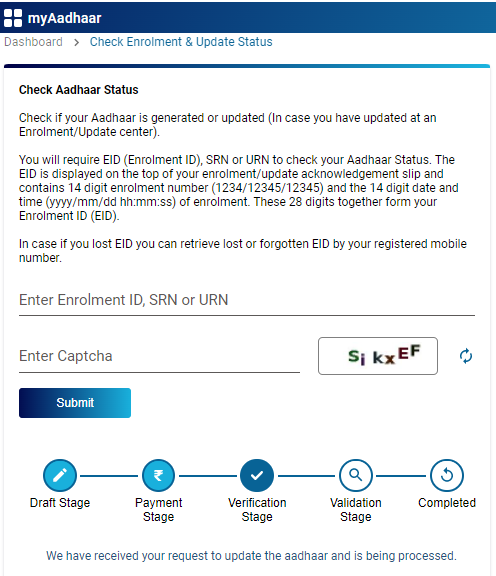
Table of Contents
Aadhaar Card
The 12-digit number that is provided by the Unique Identification Authority of India (UIDAI) is the Aadhaar Card. Aadhaar Card contains information like your name, address, gender, and date of birth. In case you like to make changes to the Aadhaar Card, you can do so by visiting the Aadhaar Enrolment Centre or on the official website of the Unique Identification Authority of India (UIDAI).
How to Check Aadhaar Card Update Status Online
Important Note: Before you need to Check Aadhaar Demographics Updates data online, you must have the SRN number or URN Number, or Enrollment ID details in your hand.
Follow the below steps to Check Aadhaar Card Update Status Online:
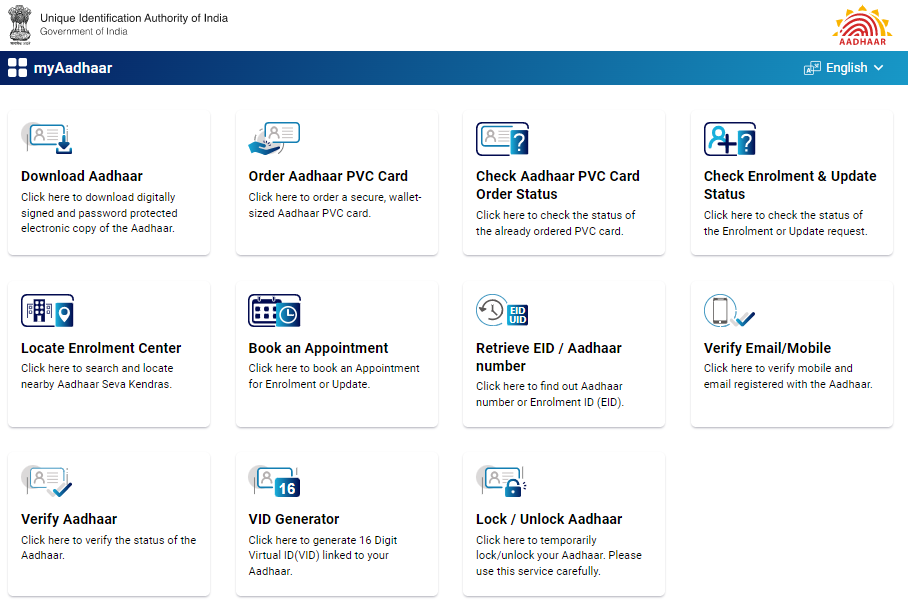
Step 1: Directly visit the official UIDAI website ( https://myaadhaar.uidai.gov.in/ )
Step 2: Choose the Option as Check Enrollment & Update Status Menu
Step 3: You will require EID (Enrolment ID), SRN, or URN to check your Aadhaar Status. The EID is displayed on the top of your enrolment/update acknowledgment slip and contains 14 digit enrolment number (1234/12345/12345) and the 14-digit date and time (yyyy/mm/dd hh:mm:ss) of enrolment. These 28 digits together form your Enrolment ID (EID).
Step 4: Enter EID or SRN or URN Number and Enter the Captcha shown on the box.
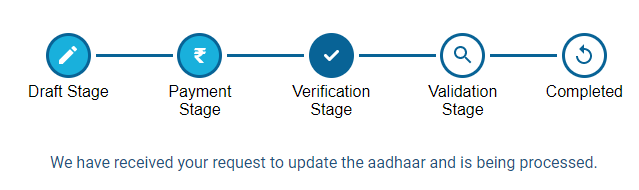
Step 5: Once Successfully Submitted it will show the current status of your aadhaar demographic update status.
How to Check Aadhaar Card Update Status Online Step by Step Video
Subscribe our Youtube Channels to get more latest updates.
Coming Soon…
How to Update Aadhaar Card Demographic Details Offline
- Directly visit the Local nearby Aadhaar Enrollment/Update Centre
- Ask the details for updating demographics data update procedure
- Fill out the Aadhaar Update Request Form
- Form Filling you must enter your registered mobile number, it will help you to get the latest update notifications
- Once submitted the form you request will be registered by the Aadhaar enrollment Executive.
- At last, You will receive an acknowledgment slip containing the URN number.
- Finally, You just need to pay the Name Update Request Fees Rs 50/- to the respective executive for this service.
Important Website Links
| UIDAI Official Website | Click Here |
| Direct myAadhaar Website Login | Click here |
| Direct myAadhaar Login with OTP Link | Click here |
| myAadhaar Update Status Check Link | Click here |
| Aadhaar Update Request Form Download Link | Click here |
Conclusion:
I hope this article, is really helpful for you to understand How to Check Aadhaar Card Update Status Online in Tamilnadu. if you like this article share it with your friends and all. Share the love with others with help to know this wonderful online e-service portal for Aadhaar card Demographics services.