
Change Family Head Smart Ration Card Online: In this article, we discuss How to Change Family Head in Smart Ration Card Online in Tamilnadu. Tamilnadu Government provides the Smart Ration Card for all citizens in Tamilnadu to get the benefits of the ration shop to collect rice, sugar, wheat, oil, and so on…
Before you proceed to Change Family head Smart Ration Card Online, You just need a valid mobile for this service and your mobile number must be linked with your smart ration card. otherwise, you can’t update the required services online.
Below I will add the procedure to Change Family head Smart Ration Card Online using the Tamilnadu government officially launched a website for Smart Ration Card Services TNPDS Website, TNPDS – Tamilnadu Public Distributed System.
The TNPDS website provides all the information about your smart cards, you can easily check at any time with your registered mobile number on the smart ration card. TNPDS portal also provides free support services for citizens to clarify doubts and queries related to Smart Ration Card details.
Also Check: How to Apply for Smart Ration Card Online in Tamilnadu 2022 | TNPDS | tnpds.gov.in
Table of Contents
How to Change Family Head Smart Ration Card Online in Tamilnadu
Important Note: Before you proceed to login to the TNPDS website, you must have a smart ration card linked mobile number, the mobile number must be registered with your smart ration card otherwise you can’t access the get the available services for your smart ration card online.
Follow the below step by step procedure to Change Family Head Smart Ration Card Online on TNPDS,
Step 1: First Directly visit the official website for Tamilnadu Public Distribution System (TNPDS). Click Here to Visit the official website
Step 2: Then Move to the Smart Card Application Services Section on the Right side of the website. check the below image for better clarification
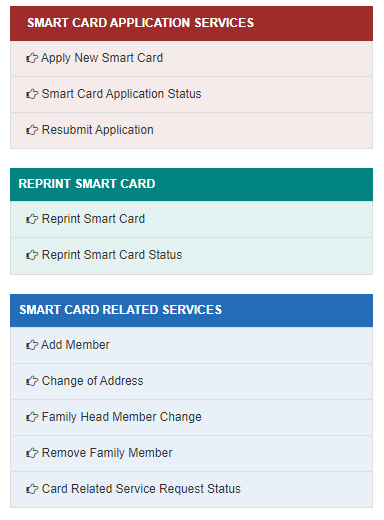
Step 3: Then click on the Family Head Member Change menu under the Smart Card Related Services Section
Step 4: It will redirect to the login page, Enter your smart ration card registered 10 digit mobile and enter the shown captcha code to click submit.
Step 5: Enter the 7 Digit OTP received on your registered mobile number and click submit.
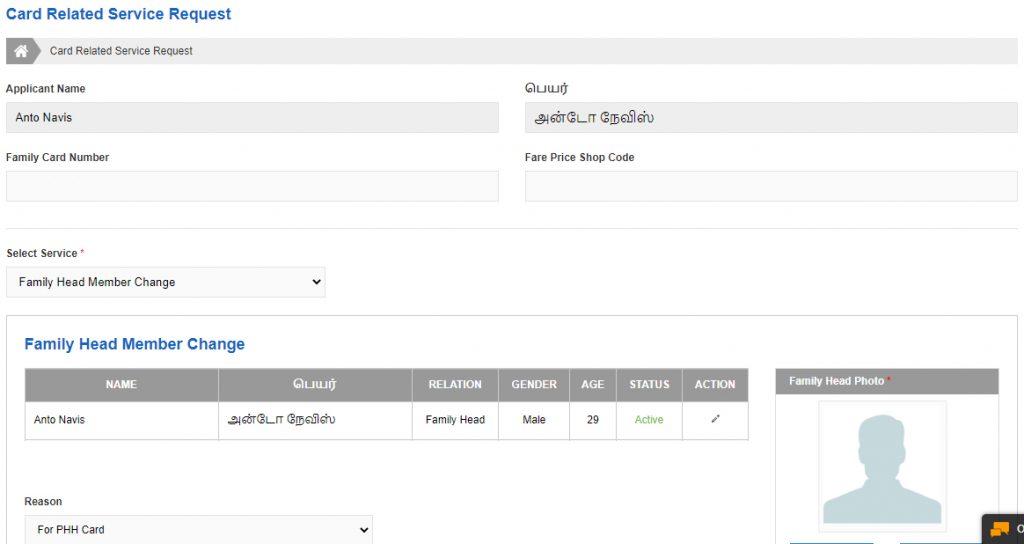
Step 6: It will directly open the card-related service request page, Default the page will contain the Applicant name, Family Card Number, as well as Fare Price Shop Code Details.
Step 7: Select Service dropdown section will automatically choose the option Family Head Member Change
Supporting Documents to Change Family Head Smart Card Online in TNPDS
- Aadhaar Card (ஆதார் அட்டை)
- Death Certificate(இறப்பு சான்றிதழ்)
- Divorce Certificate (விவாகரத்து சான்றிதழ்)
- No Objection Certificate from RI (வருவாய் ஆய்வாளர் தடையின்மைச் சான்றிதழ்)
Also Check: How to Remove Family Member Names Smart Card Online in Tamilnadu
Step 8: Choose the reason on the dropdown menu,
Reason List:
- Divorce Document
- Death Certificate
- For PPH Card
- Others
You can choose anyone on this list, if not on the list choose the other option and enter the valid reason on the text box
Step 9: Choose the support document file, and You can upload pdf, png, gif, jpeg, and pdf files under 1.0 MB in size only
Important Note: Once You update the family head smart ration card, you must need to change the Photo as well as change the Relation Status, Forgot to change the relationship status and the photo means it will be displayed as it is, it makes the wrong relation status on your reprint smart ration card.
Step 10: Finally Tick on the Declaration box and Check if all the details are entered correctly or not, once submit you can’t change without the smart ration card application approved.
Step 11: Click on the Submit button, Once submit you will get the Change Family Head Smart Ration Card Reference number as well as you will get the notification about the reference number on your registered mobile number.
Also Check: How to Check Smart Ration Card Update Status Online in Tamilnadu 2022 | TNPDS | tnpds.gov.in
Help Desk / Toll-Free Number
You can dial the toll-free number, 1967 ( or ) 1800-425-5901, and know the details of your smart ration card details for free.
Email Support
You can Mail us support@tnpds.com for Queries related to Smart Ration Card
Important Web Links
| TNPDS Official Website | Click Here |
| Change Family Head Smart Card Online Link | Click here |
| Smart Ration Card Application Status Link | Click here |
| Card Related Service Request Status Link | Click here |
Conclusion:
I hope this article, is really helpful for you to understand How to Change Family Head Smart Card Online in Tamilnadu. Tamilnadu Public Distribution System ( TNPDS) Web Portal. if you like this article share it with your friends and all. Share the love with others with help others to know this wonderful option to easily Change Family Head on Smart Ration Card Online.