
Update Aadhaar Card Name Online: In this article, We discuss How to Update your Aadhaar Card Name Online, You can easily update your name on aadhaar card online, Not taking more time to update the details for your aadhaar card online.
The Aadhaar Card web portal allows you to check your aadhaar card details, Update demographic data like Name, DOB, and Address. In this article I will explain how to change the name on aadhaar card, In upcoming articles, we will add how to update the Date of Birth (DOB), Address, and so on…
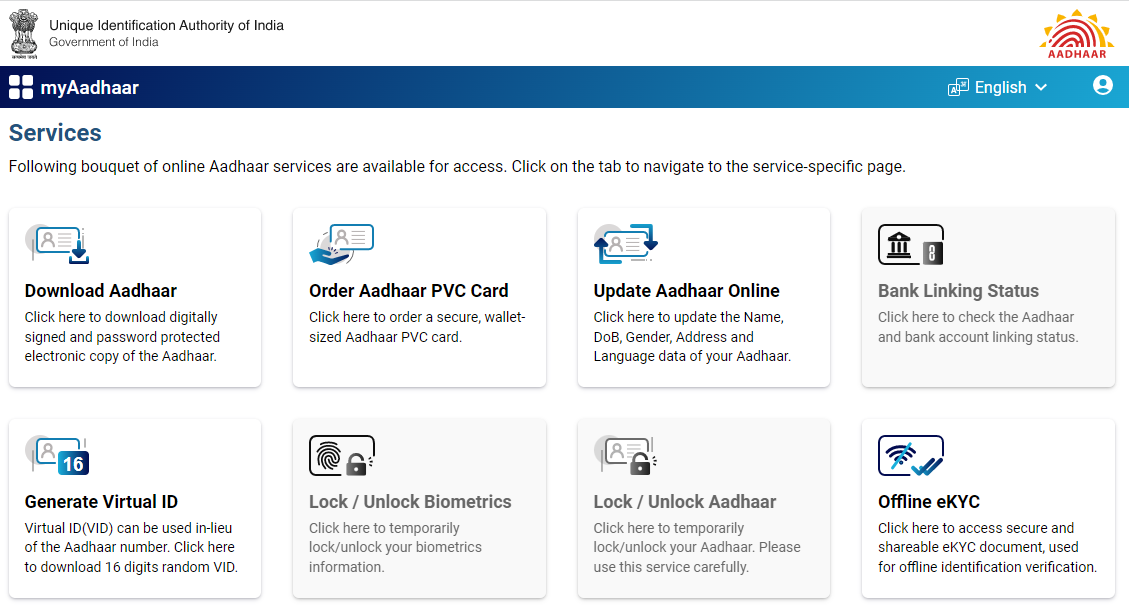
Table of Contents
Aadhaar Card
The 12-digit number that is provided by the Unique Identification Authority of India (UIDAI) is the Aadhaar Card. Aadhaar Card contains information like your name, address, gender, and date of birth. In case you like to make changes to the Aadhaar Card, you can do so by visiting the Aadhaar Enrolment Centre or on the official website of the Unique Identification Authority of India (UIDAI).
How to Update Aadhaar Card Name Online
Important Note: Before you need to Update Demographics data online, you must have the aadhaar card registered mobile number in your hand and supporting documents proof in soft copy files.
| Application Fees | Rs 50/- |
| Time Taken | Up to 5 to 7 Days |
| Apply Mode | Online / Offline |
| Validity Period | Life-Long |
| Apply Website | myaadhaar.uidai.gov.in |
| Payment Mode | Online |
Follow the below steps to Update Aadhaar Card Name Online, With an easy step-by-step guide.
Step 1: Directly visit the official UIDAI website ( https://myaadhaar.uidai.gov.in/ )
Step 2: Then click on Login With Aadhaar OTP.
Step 3: Enter Your Aadhaar details and type the captcha as same as shown on the box
Step 4: Click Send OTP
Step 5: Enter OTP and Click Login
Step 6: Choose the option Update Aadhaar Online
Step 7: Read the How it Works Section, it’s helpful to understand how to update the name on aadhaar card online, approval time periods, documents, Payments, and so on…
Step 8: Click Proceed to Update Aadhaar
Step 9: Choose the Name Option and Click Proceed to Update Aadhaar, Main thing is you can change the name only 2 times so be careful to update your name without an error.
Step 10: Type the English Name as well as Tamil Name in the correct form, if automatically changing the Tamil text is wrong means you can use any online Tamil typing or google input tools to type the correct Tamil letters for your name.
Supporting Documents to Update Aadhaar Card Name Online:
1. Arms License.
2. Certificate of Identify Having Photo Issued by Gazetted Officer or Tehsildar On Letterhead.
3. Cghs / Echs Photo Card.
4. Driving License.
5. Freedom Fighter Photo Card.
6. Kissan Photo Passbook.
7. Legal Name Change Certificate.
8. Marriage Certificate With Photograph.
9. Nrega Job Card.
10. PAN Card.
How to Update Aadhaar Card Name Online Step by Step Video
Subscribe our Youtube Channels to get more latest updates.
Step 11: I am using PAN Card for Name Correction, You can use any one of the supporting documents on that drop-down option.
Step 12: Important Note: Your supporting document identity proof must contain your name as well as a photograph, otherwise the update request will be rejected.
Step 13: Choose the option PAN card and Click on the view details and upload the document.
Step 14: Choose the valid identity proof copy and click the next option
Step 15: Verify all the entered details and Choose the options to click next t0 proceed for the payment,
Step 16: Payment cost for Update Demographics details online Rs 50/-
Step 17: Once successfully make the payment you will get the SRN Status Number through your registered mobile number.
Step 18: Use the SRN number to Check the Update Status online.
Step 19: Download the Acknowledgment for your future reference.
Step 20: Approximately it will take around 5-7 business days to Update Aadhaar Card Name Online, you can login and check it at any time.
How to Update Aadhaar Card Name Offline
- Directly visit the Local nearby Aadhaar Enrollment/Update Centre
- Ask for the details for updating the demographics data update procedure
- Fill out the Aadhaar Update Request Form
- Form Filling you must enter your registered mobile number, it will help you to get the latest update notifications
- Once submitted the form you request will be registered by the Aadhaar enrollment Executive.
- At last, You will receive an acknowledgment slip containing the URN number.
- Finally, You must need to pay the Name Update Request Fees Rs 50/- to the respective executive for this service.
Important Website Links
| UIDAI Official Website | Click Here |
| Direct myAadhaar Website Login | Click here |
| Direct myAadhaar Login with OTP Link | Click here |
| myAadhaar Update Status Check Link | Click here |
| Aadhaar Update Request Form Download Link | Click here |
Conclusion:
I hope this article, is really helpful for you to understand How to Update Aadhaar Card Name Online in Tamilnadu. if you like this article share it with your friends and all. Share the love with others with help others to know this wonderful online e-service portal for Aadhaar card Demographics services.